September 19, 2020 5:08 PM 上次想做vscode自定义语言的高亮显示,最后调研结果是用vs code的插件实现,以下是总结。
官网介绍 https://code.visualstudio.com/api
按照官网操作基本就可以实现啦!~ 本文最后有参考的网站~
环境
- Node
- Git
- Yeoman&VS Code Extension Generator
npm install -g yo generator-code - 创建
yo code code . - 调试 F5
Code
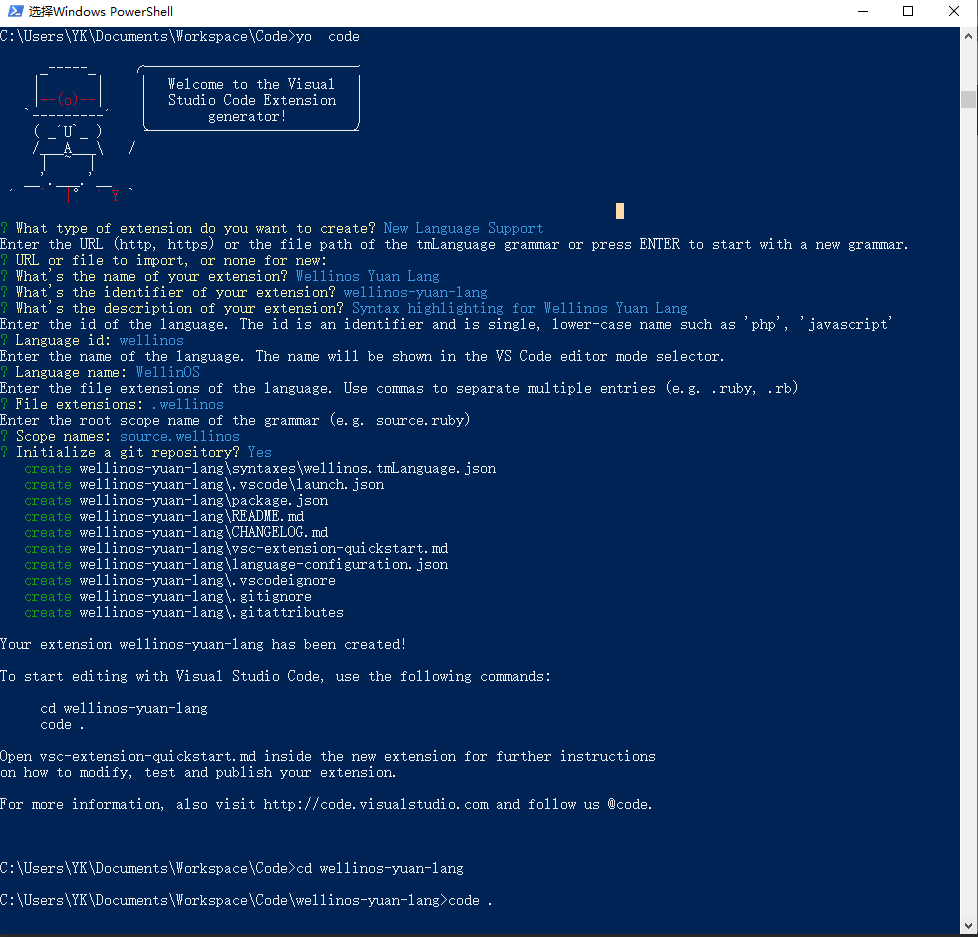
这次没有按照官网去写helloworld,而是直接创建的”New Language Support” 以下是完成的代码及相关配置:
Shell log
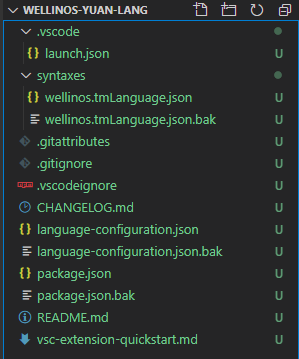
插件目录结构
其中.bak是我后面做的备份
Code
- package.json
{ "name": "wellinos-yuan-lang", "displayName": "Wellinos Yuan Lang", "description": "Syntax highlighting for Wellinos Yuan Lang", "version": "0.0.1", "engines": { "vscode": "^1.49.0" }, "categories": [ "Programming Languages" ], "contributes": { "languages": [{ "id": "wellinos", "aliases": ["WellinOS", "wellinos"], "extensions": [".wellinos"], "configuration": "./language-configuration.json" }], "grammars": [{ "language": "wellinos", "scopeName": "source.wellinos", "path": "./syntaxes/wellinos.tmLanguage.json", "embeddedLanguages": { "meta.embedded.block.javascript": "javascript" } }] } } - language-configuration.json
{ "comments": { // symbol used for single line comment. Remove this entry if your language does not support line comments "lineComment": "//", // symbols used for start and end a block comment. Remove this entry if your language does not support block comments "blockComment": [ "/*", "*/" ] }, // symbols used as brackets "brackets": [ ["{", "}"], ["[", "]"], ["(", ")"] ], // symbols that are auto closed when typing "autoClosingPairs": [ ["{", "}"], ["[", "]"], ["(", ")"], ["\"", "\""], ["'", "'"], { "open": "/**", "close": " */", "notIn": ["string"] }, ["Object<", ">"], ["ObjectHistory<", ">"], ["ObjectPlan<", ">"], ["ObjectAttribute<", ">"], ["ObjectHistoryAttribute<", ">"], ["ObjectPlanAttribute<", ">"], ["Event<", ">"], ["EventHistory<", ">"], ["EventPlan<", ">"], ["EventAttribute<", ">"], ["EventHistoryAttribute<", ">"], ["EventPlanAttribute<", ">"], ["CommonEvent<", ">"], ["CommonEventAttribute<", ">"], ["Enum<", ">"], ["Flow[", "]"], ["Interface[", "]"], ["Timeout[", "]"], ], // symbols that can be used to surround a selection "surroundingPairs": [ ["{", "}"], ["[", "]"], ["(", ")"], ["\"", "\""], ["'", "'"], ["<", ">"] ], //Copy from https://github.com/microsoft/vscode-extension-samples/blob/master/language-configuration-sample/language-configuration.json "autoCloseBefore": ";:.,=}])>` \n\t", "folding": { "markers": { "start": "^\\s*//\\s*#?region\\b", "end": "^\\s*//\\s*#?endregion\\b" } }, "wordPattern": "(-?\\d*\\.\\d\\w*)|([^\\`\\~\\!\\@\\#\\%\\^\\&\\*\\(\\)\\-\\=\\+\\[\\{\\]\\}\\\\\\|\\;\\:\\'\\\"\\,\\.\\<\\>\\/\\?\\s]+)", "indentationRules": { "increaseIndentPattern": "^((?!.*?\\/\\*).*\\*\/)?\\s*[\\}\\]].*$", "decreaseIndentPattern": "^((?!\\/\\/).)*(\\{[^}\"'`]*|\\([^)\"'`]*|\\[[^\\]\"'`]*)$" } } - wellinos.tmLanguage.json
拷贝javascript的规则,然后修改了”support-objects”,以适配wellinos的基本数据类型和系统函数
"support-objects": {
          "patterns": [{
              "name": "support.constant.wellinos",
              "match": "(?x)(?<![_$[:alnum:]])(?:(?<=\\.\\.\\.)|(?<!\\.))(=[ ]*)(null|undefined)\\b(?!\\$)"
          },{
              "name": "support.class.keyword.wellinos",
              "match": "(?x)(?<![_$[:alnum:]])(?:(?<=\\.\\.\\.)|(?<!\\.))(Object|ObjectHistory|ObjectPlan|ObjectAttribute|ObjectHistoryAttribute|ObjectPlanAttribute|\n  Event|EventHistory|EventPlan|EventAttribute|EventHistoryAttribute|EventPlanAttribute|CommonEvent|CommonEventAttribute|\n Enum|SizeF|Screen|Point3D)\\b(?!\\$)"
          },{
              "name": "support.class.builtin.wellinos",
              "match": "(?x)(?<![_$[:alnum:]])(?:(?<=\\.\\.\\.)|(?<!\\.))(bool|int8|uint8|int16|uint16|int32|uint32|int64|uint64|float|double|numeric|string)\\b(?!\\$)"
          },{
              "name": "support.class.builtin.object.wellinos",
              "match": "(?x)(?<![_$[:alnum:]])(?:(?<=\\.\\.\\.)|(?<!\\.))(datetime|timespan|JSONObject|Color|Pen|Brush|Front|Image)\\b(?!\\$)"
          },{
              "match": "(?x)(?<![_$[:alnum:]])(?:(?<=\\.\\.\\.)|(?<!\\.))(Abs|Sqrt|LogE|Log|Exp|Sin|Cos|Tan|ArcSin|ArcCos|ArcTan|Pow|Mod|Rand|\n  ShiftLeft|ShiftRight|RollLeft|RollRight|\n  RoundUp|RoundDown|Round)\\b(?!\\$)",
              "captures": {
                  "1": {
                      "name": "support.function.math.wellinos"
                  },
                  "2": {
                      "name": "support.constant.math.wellinos"
                  },
                  "3": {
                      "name": "support.constant.property.math.wellinos"
                  },
                  "4": {
                      "name": "punctuation.accessor.wellinos"
                  },
                  "5": {
                      "name": "punctuation.accessor.optional.wellinos"
                  }
              }
          },{
              "name": "support.function.typeconversion.wellinos",
              "match": "(?x)(?<![_$[:alnum:]])(?:(?<=\\.\\.\\.)|(?<!\\.))(Number|Int|Intparse|String|StringFromInt|StringFromReal|Boolean)\\b(?!\\$)"
          },{
              "name": "support.function.json.wellinos",
              "match": "(?x)(?<![_$[:alnum:]])(?:(?<=\\.\\.\\.)|(?<!\\.))(JSONstringify|JSONparse)\\b(?!\\$)"
          },{
              "name": "support.function.screen.wellinos",
              "match": "(?x)(?<![_$[:alnum:]])(?:(?<=\\.\\.\\.)|(?<!\\.))(GetScreen|GetScreenResolution|GetScreenResource|GetScreenResourceSize|GetScreenResourceSize|GetScreenResourceLocation|PrintScreen)\\b(?!\\$)"
          }]
     }
参考网站
TypeScript 安装 | 菜鸟教程 vs code设置自定义代码块的方法_码在当下的博客-CSDN博客 自定义visual studio code 语法高亮 | 幽幽过客 Contribution Points | Visual Studio Code Extension API Language Extensions Overview | Visual Studio Code Extension API microsoft/vscode-extension-samples: Sample code illustrating the VS Code extension API. Extension API | Visual Studio Code Extension API vscode-extension-samples/language-configuration.json at master · microsoft/vscode-extension-samples YAML 入门教程 | 菜鸟教程 Language Grammars — TextMate 1.x Manual Regular Expressions — TextMate 1.x Manual Writing a TextMate Grammar: Some Lessons Learned